
You can install a web app on almost any phone, tablet or computer, and you don’t need an app store to do it. A web app that can be installed is called a progressive web app, or PWA. Once installed, it gets its own icon, opens in its own window and starts quickly, just like any other app. Here is how to do it on your device.
Install a web app on Android (phone or tablet)
- Open the web app’s address in Chrome.
- Tap the three dots in the top right corner.
- Tap Install and Create Shortcut, or Add to Home screen.
- Tap Install or Add to confirm.
The icon now sits on your home screen. In Samsung Internet, tap the menu, then Add page to, then Home screen.
Install a web app on iPhone or iPad
- Open the web app’s address in Safari.
- Tap the Share button, the square with an arrow pointing up.
- Scroll down and tap Add to Home Screen.
- Tap Add.
Safari is the most reliable choice. On newer versions of iOS, other browsers may offer this too.
Install a web app on Windows or Mac
In Chrome or Edge, look for the install icon at the right end of the address bar and click it, then choose Install. You can also open the browser menu and look for an install option. On a Mac running Safari 17 or later, open the File menu and choose Add to Dock. Firefox on a computer does not offer installation, so use Chrome, Edge or Safari instead.
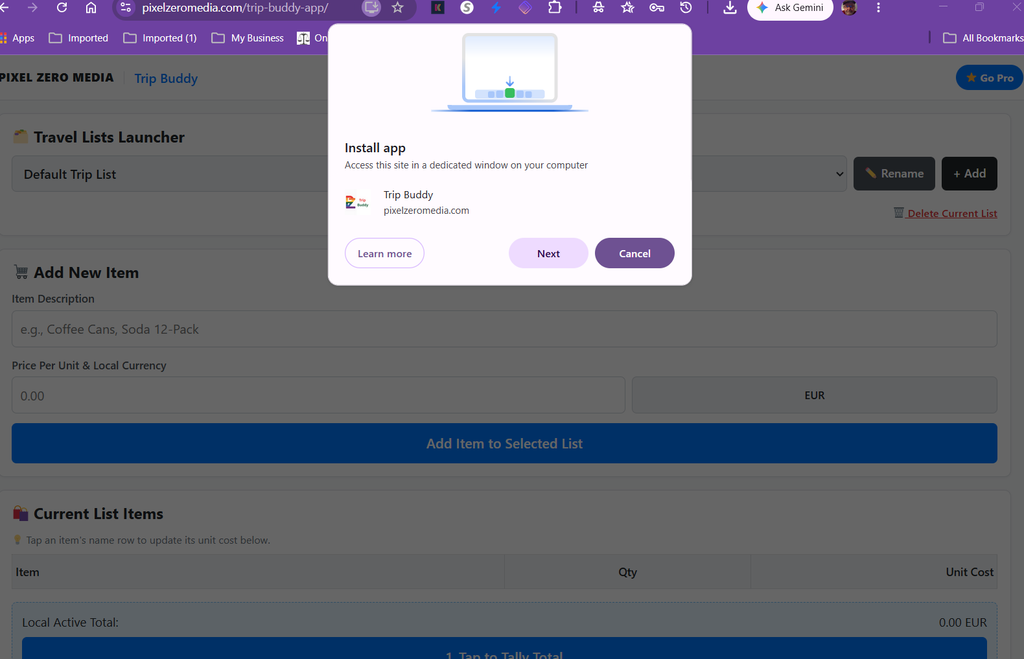
Can’t find the install option?
- Private or incognito windows hide it. Open the address in a normal window instead.
- Give the page a few seconds to finish loading before you look.
- Try another browser. Chrome and Safari are the safest choices.
- Not every website is installable. The site has to be built as a web app. Trip Buddy is.
Good to know
- A web app updates itself and takes up very little space.
- To remove it, press and hold the icon on a phone or tablet, or right-click it on a computer, and choose the remove or uninstall option.
- Some web apps keep your information in your browser. Clearing your browser data can erase it, so export anything important first.
Try it with Trip Buddy
Trip Buddy is our travel shopping app. It converts prices into your home currency, keeps an expense ledger and finds places near you. It is free to try, and you can install it with the steps above. Open Trip Buddy here, or read more about it first, here.